|
1. Install and Run Blink.
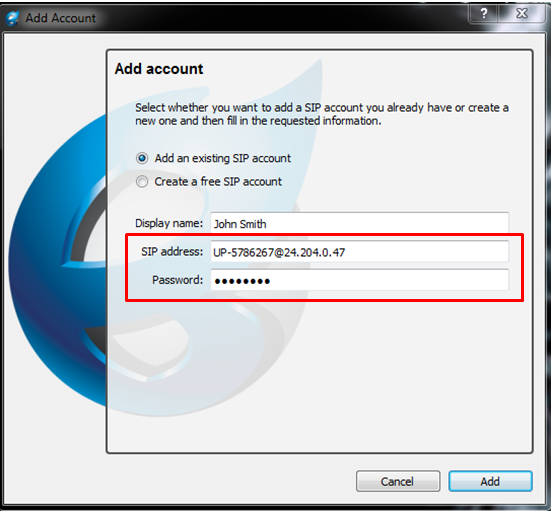
2. When account menu will pop up choose "add an existing SIP account".
3. Fill in SIP address and password from your Comfi account. It can be found under My Account -> VoIP Account.
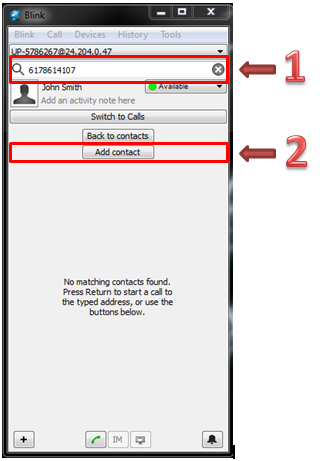
4. To dial or add a number to the contact book simply TYPE the number in the Search box and click "Add Contact".
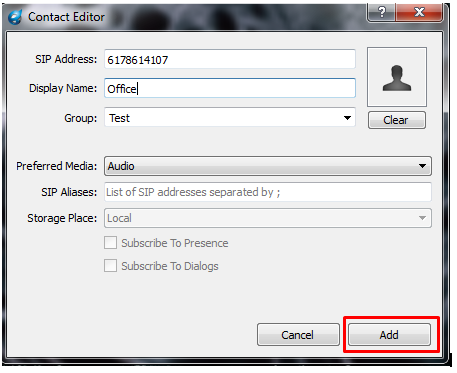
5. Name the contact, choose the group, and you are ready to Call.
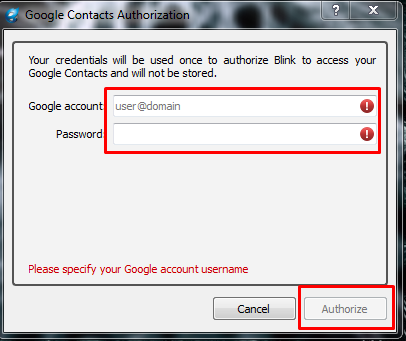
6. There is also an option to add contacts from Google accounts. Click Tools=> Enable Google Contacts.
7. Type in your login and password. Click "Authorize". Contacts will be automatically imported.
8. To dial international, please dial the 011 exit code, before the country code, for all
destination numbers outside of the North American Dialing Plan.
|